
OnlyFans Chatter KPIs: Response Time, PPV Conversion and Revenue per Shift
Measure OnlyFans chatter performance with the KPIs that drive revenue, not vanity metrics.

If you manage OnlyFans chatters, the KPIs that matter are not message volume or hours logged. The numbers that tell you whether the team is creating revenue are response time, PPV conversion, revenue per shift, retention after interaction, and recovery from inactive fans. Track those by shift, compare them by account tier, and review them daily with the actual scripts and fan segments that produced the outcome.
This guide shows the simplest way to measure OnlyFans chatter performance without overcomplicating the dashboard. You will get a practical KPI framework, a scorecard table, examples of strong and weak performance, and a checklist you can use with a team lead or agency manager.
Key Takeaways
- Measure chatters on revenue-linked KPIs, not on how busy the inbox looks.
- Use response time, PPV conversion, revenue per shift, retention, and reactivation as your core scorecard.
- Separate metrics by fan segment so a slow reply to a whale does not get hidden inside a large average.
- Review performance by shift, not only by creator or by day, so coaching stays specific and fair.
- Pair the numbers with scripts, offers, and fan notes from OnlyFans chatter scripts for agencies and how to retain OnlyFans subscribers.
The KPI Set That Actually Measures Chatter Performance
The easiest mistake in chatter management is to measure the wrong thing. A team can send hundreds of messages and still underperform if the replies are slow, the offers are weak, or the right fans never receive the right follow-up. The KPI set below keeps the team focused on outcomes that matter to the business.
| KPI | How to calculate it | Why it matters | What to watch for |
|---|---|---|---|
| First response time | Time from inbound fan message to the first useful reply. | Shows whether the team is catching interest while intent is still warm. | Slow replies on new fans and high-value conversations. |
| PPV conversion | PPV purchases divided by the qualified sends or conversations that received the offer. | Tells you whether the message, timing, and audience are aligned. | Lots of sends with little or no purchase activity. |
| Revenue per shift | Shift revenue divided by staffed hours or by the recorded shift block. | Shows whether a shift produced value, not just activity. | High message counts with weak cash collection. |
| Retention after interaction | Fans still active after a set period divided by fans who received the conversation or offer. | Helps you see if the chatter is building a relationship or burning it out. | Short-term sales with weak repeat activity. |
| Reactivation rate | Returned inactive fans divided by the reactivation list contacted. | Shows whether the team can revive old demand instead of only chasing new leads. | No movement in expired or dormant segments. |
A Practical Framework for Tracking a Shift
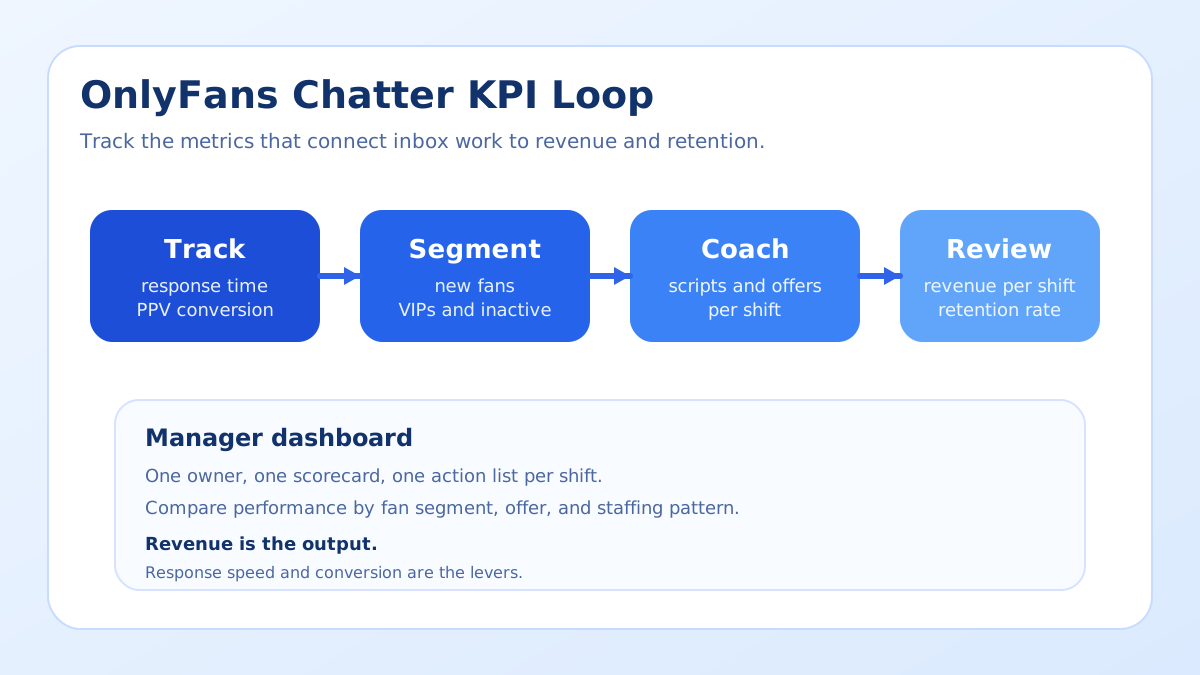
The best KPI system is simple enough to use every day and strict enough to catch drift. A chatter manager should not need a month-end report to understand what happened. Use a four-step loop that keeps the metrics connected to the actual inbox work.
1. Capture every revenue-relevant event
Start by logging the events that can influence revenue: first reply, PPV send, PPV purchase, content request, renewal warning, and reactivation attempt. If those events are not consistently recorded, the team will argue about memory instead of reviewing facts. This is where fan notes and structured CRM fields matter more than loose handoffs. If you need a stronger foundation, pair the process with OnlyFans welcome message examples so every new fan receives a consistent opener.
2. Separate the numbers by fan segment
Do not mix new fans, warm subscribers, whales, and inactive fans into one average. A low-value segment can make a strong chatter look ordinary, while a whale conversation can hide a poor system. Break the scorecard into the same buckets you already use in the OnlyFans PPV pricing guide. That way the offer, the price, and the audience line up with the KPI.
3. Compare performance by shift, not by intuition
A shift is the cleanest unit of analysis because it shows who handled the inbox, which fans were available, and which offers were sent. One shift may inherit a hot inbox and another may inherit a quiet room, so the raw count matters less than the context. When you compare shifts, use the same rules for time window, account type, and fan segment. That is the only way to coach fairly.
4. Turn the metric into one coaching action
Every KPI review should end with a change the chatter can make immediately. If response time is weak, reduce handoff delays. If PPV conversion is weak, change the opener or the price. If revenue per shift is weak, check whether the chatter is spending too much time in low-value back-and-forth. Coaching works when it changes behavior, not when it creates a prettier spreadsheet.
How to Read the Numbers Without Fooling Yourself
Metrics become dangerous when they are used as a scoreboard without context. The goal is not to punish slow days. The goal is to identify the reason a shift underperformed and then remove the bottleneck.
Here is a simple way to interpret the most common patterns:
- Fast response, low conversion: The team is present but not persuasive. Review the opening message, fan segment, and offer.
- Slow response, high conversion: The chatter can close when the fan is engaged, but the team is probably leaving money on the table by waiting too long.
- High activity, low revenue per shift: The inbox is busy, but the work is not moving toward a purchase or renewal.
- Strong PPV conversion, weak retention: The short-term offer works, but the relationship is being overstretched.
These are not abstract ideas. They are the kinds of patterns you see when an agency moves too quickly from chat volume to revenue claims. A better approach is to review the conversation path from opener to purchase and from purchase to the next touchpoint. That is where the useful coaching notes live.
For instance, a chatter might write many messages to a new subscriber and feel productive, but the real question is whether that subscriber stays active after the first interaction. If the fan disappears, the conversation was a cost, not a win. If you are building a stronger retention path, tie the KPI review to the tactics in how to retain OnlyFans subscribers.
Another common mistake is to review all offers together. A low-priced teaser and a premium bundle should never be scored as the same kind of sale. If your agency uses different PPV levels, the chatter has to know which offer belongs to which fan. Otherwise the data tells you only that something sold, not why it sold.
Examples That Make the KPI System Concrete
Example one: a chatter handles a warm inbox, replies quickly, and sends a PPV to a fan who has already shown spending intent. The purchase lands, but the fan is never tagged for follow-up. The KPI sheet says the shift was successful, but the retention score two days later tells a different story. The fix is not to ask for more messages. It is to add a post-purchase handoff step.
Example two: another chatter spends a lot of time on conversation, reacts quickly, and keeps fans engaged, but the PPV conversion is poor. In that case the team is probably using a weak pitch, an awkward timing pattern, or a price that does not match the segment. The right coaching move is to test a different script from the chatter scripts guide, not to push the chatter to work longer hours.
Example three: a night shift looks quiet and the manager assumes the team underperformed. Once revenue per shift is checked, it turns out the shift processed a few high-value replies that produced more revenue than a busier daytime block. The lesson is simple: volume is not value.
Those examples matter because a KPI system should change decisions. When your dashboard can explain whether a shift is strong, weak, or misread, the manager can coach with confidence and the chatter can improve without guessing.
Connect your scorecard to fan context
If you want your team to compare shift performance, fan notes, and offer results in one place, Open Substy and use it to keep the inbox context attached to the revenue data.
Checklist for Chatter Managers
- Define one owner for KPI reporting and one owner for coaching.
- Track first reply time, PPV conversion, revenue per shift, retention, and reactivation.
- Break all numbers into fan segments instead of using one blended average.
- Record the script, offer, and price used in every important conversation.
- Review each shift within a short window so details are still fresh.
- Keep a note of what changed after the review so you can test the effect later.
- Use the same definitions every week so the scorecard stays comparable.
- Escalate anomalies, such as sudden drops in conversion or unusually high retention, immediately.
If your team is large, connect the KPI process to the account structure in managing multiple OnlyFans accounts as an agency so ownership is clear and the data does not get lost between creators.
Pair the numbers with the chatter training scorecard so the review covers accuracy, context, boundaries and handoff quality, not only sales.
How Substy Helps You Manage the Numbers
Substy is useful when the KPI review has to stay tied to actual conversation work. Use the CRM to keep fan context attached to the account, fan memory to preserve preferences across handoffs, analytics to compare shifts, PPV scripts to standardize offer language, and team management to keep responsibilities visible. That combination matters more than a generic spreadsheet because the scorecard stays connected to the next action.
For agencies that are still building the operating layer, pair the KPI workflow with the OnlyFans AI chatbot setup checklist so automation supports the same reporting logic rather than creating a second source of truth. If you also need stronger fan lifecycle coverage, keep retention guidance and PPV pricing guidance inside the same workflow.
FAQ
Put your KPI workflow into practice
If you want a cleaner way to measure chatter performance and keep the inbox, scripts, and fan context aligned, Open Substy and build the KPI workflow inside the same system your team already uses.
Open Substy
Track fewer metrics, but make them visible every day. A simple scorecard is easier to coach and harder to game.
Shift-level reviews expose bottlenecks faster than weekly averages because they keep the context attached to the result.