
How to Create an AI Influencer on Fanvue: Setup, Content and Monetization
Set up a compliant Fanvue AI influencer with the right disclosure, content system, and monetization plan.

Key Takeaways
- Fanvue currently allows AI creators, but the account must be set up with clear disclosure and compliant content rules.
- The safest launch plan is to define the persona, label it clearly, build a content library, and choose monetization layers before you post.
- Fanvue's help centre says AI-generated media must be disclosed prominently and the platform shows an AI tag on creator profiles.
- Use subscriptions, PPV, tips, and direct messaging as separate revenue layers instead of depending on one offer.
- If you run more than one creator account, you need one workflow for consistency, approval, scheduling, and analytics.
What Fanvue currently allows
Fanvue is one of the few creator platforms that openly supports AI creators. Its help centre says fully AI-generated content is allowed, AI-generated media must be disclosed prominently, and AI creator accounts are clearly labeled with an AI tag in the profile bio. The same help material also explains that AI creators are a recognized and verified category on the platform. For the current wording, see Fanvue's AI content policy and Fanvue's platform overview.
That matters because the platform is not asking you to hide the fact that the creator is synthetic. It is asking you to label it clearly, keep it respectful, and avoid anything misleading or copied from another creator without permission. If you start with that logic, the rest of the workflow becomes much easier to manage.
Fanvue's help centre also states that creators can earn through subscriptions, tips, PPV messages, standalone content sales, voice calls, and voice notes, while the platform overview notes the standard 80% creator share and 20% commission. That gives an AI influencer several viable ways to monetise once the account is compliant and active.
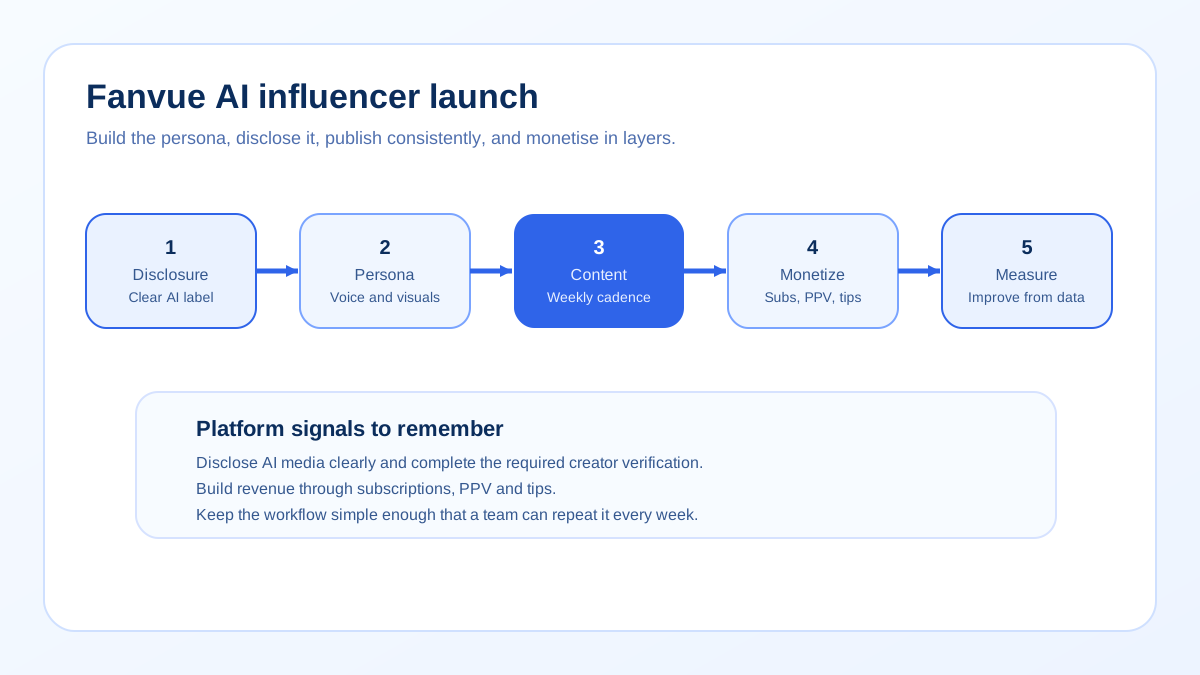
Step 1: define the character before you build the account
A good AI influencer starts with a clear character sheet. Do not begin with images and try to invent personality later. Decide who the creator is, who the audience is, what the tone should feel like, and what the account will be known for. If the persona is vague, the content will feel inconsistent and the fan experience will look improvised.
Build a short persona brief
Your brief should answer five questions. What is the name and visual style? What is the conversational tone? What kind of content does the character post? What does the creator never do? What makes the account different from every other AI page in the feed? Keep the brief short enough that a team can use it daily.
Set the disclosure line early
Fanvue requires prominent disclosure for AI-generated media. That means the profile bio, captions, or media watermark should make the AI status obvious before a fan commits. Put the disclosure in the same place every time so the account does not drift into ambiguity when the posting schedule gets busy.
Think of disclosure as part of the brand, not as a disclaimer you hide at the bottom. The clearer the label, the less friction you will face later when fans ask what the page is and how it works.
Step 2: create the visual and voice system
The strongest AI influencers feel like a designed system. They have repeatable visual cues, a stable voice, and a handful of recurring content themes. That consistency is what makes the page feel intentional rather than random.
Visual rules
Define the camera angle, color palette, pose style, and editing approach before you produce large volumes of content. If the account uses too many visual styles at once, the fan cannot tell what the creator stands for. A constrained visual system is usually more memorable than a broad one.
Voice rules
The voice should be clear enough to hold a DM conversation and flexible enough to fit different post formats. A playful account should still know how to say thank you, answer a basic question, and move a fan toward a paid offer without sounding mechanical.
If you need chatter inspiration once the account is live, compare your message structure with Fanvue chatter guidance. If you manage several creator pages, keep the account logic consistent with multi-account agency workflows.
Content pillars
Pick three to five content pillars and keep returning to them. For example: teaser posts, behind-the-scenes moments, premium PPV previews, direct-message hooks, and limited-time offers. Each pillar should exist for a reason. One pillar supports discovery, another supports conversion, and another supports retention.
Launch planning table
This table gives you a practical setup order. The idea is to make each step inform the next one so the account launches with a clear identity and a usable monetization path.
| Stage | What to decide | Why it matters | Output |
|---|---|---|---|
| Persona | Name, voice, visual style, audience | Keeps the account coherent | One-page brief |
| Disclosure | Where the AI label appears | Meets Fanvue's current policy expectations | Bio, caption, or watermark rule |
| Content system | Pillars, formats, cadence | Prevents random posting | Weekly content map |
| Monetization | Subscription, PPV, tips, calls, voice notes | Turns attention into revenue | Offer ladder |
| Operations | Approval, scheduling, analytics, handoff | Keeps quality stable as volume rises | Workflow checklist |
Step 3: monetise with a ladder, not a single offer
Fanvue gives creators more than one way to earn, so do not build the page around only one sale. Start with a subscription if the page needs a stable entry point, then add PPV content for deeper interest, tips for optional support, and direct messaging for higher-touch conversion. Voice calls and voice notes can also fit a premium layer if the character and audience support them.
How to layer revenue
First, make the profile easy to understand. Second, create a reason to subscribe. Third, give fans a clear next action after they subscribe, such as a PPV unlock or a tip-based response. Fourth, use messaging to keep the most engaged fans moving. This sequence lets each layer support the next one.
Do not assume every AI influencer should monetise in the same way. Some pages do best with a low-friction subscription and lots of PPV. Others do better with a free front door and a heavier DM strategy. The best choice depends on how much conversation the persona can sustain and how strong the content library is.
If you want a revenue benchmark for related platform strategy, compare this with Fanvue fees and commission, PPV pricing strategy, and how creators monetize on MYM. The platforms differ, but the idea of layered monetization is the same.
Step 4: create the first 14 days of content
Most AI influencer launches fail because they are overdesigned but underposted. The account looks polished on day one, then goes quiet or repeats the same type of post. A better approach is to plan the first two weeks as a simple content sequence that builds trust, curiosity, and purchase intent.
Use a mix of profile builders, teaser posts, premium previews, and direct-message hooks. Keep the captions short enough to support mobile reading, and make sure each post has a job. One post can introduce the persona. Another can confirm the disclosure. A third can preview the premium experience. A fourth can invite a direct reply.
Example launch rhythm
- Days 1 to 3: introduce the creator and establish the visual style.
- Days 4 to 6: post teaser content that supports the subscription pitch.
- Days 7 to 10: release a premium preview or PPV path.
- Days 11 to 14: push conversation, retention, and repeat engagement.
That sequence gives fans enough time to understand the page without making the account feel empty. It also makes it easier to see which content pillar is doing the heavy lifting.
Common mistakes to avoid
The first mistake is hiding the AI status or burying the label. Fanvue is explicit that disclosure must be prominent, so treat it as part of the profile design. The second mistake is creating too many content styles at once. Fans need a repeatable pattern before they are willing to subscribe or buy. The third mistake is trying to monetise every post. A better mix gives the fan free context, then makes the paid step feel earned.
The fourth mistake is launching without a review process. An AI page can scale content quickly, which is exactly why it needs approval rules, scheduling discipline, and analytics. Without those guardrails, the account can become inconsistent in tone or overconfident in offers. Keep the workflow simple enough that a team can repeat it.
Finally, do not confuse novelty with strategy. An AI character is interesting, but interest alone does not create revenue. Revenue comes from a clear offer ladder, a repeatable content plan, and a conversation system that does not break when volume rises.
Checklist before you go live
- Is the AI label visible before a fan subscribes?
- Does the persona brief describe the creator clearly?
- Are the visual rules and tone rules written down?
- Do you know which content pillars will post first?
- Is your monetization ladder defined?
- Can you keep the schedule consistent for at least two weeks?
- Do you have a review process for new captions, offers, and visual assets?
- Are analytics and message handoff part of the workflow?
Substy for AI creator operations
Substy is useful when an AI influencer is part of a larger agency system. Use it to manage creator notes, schedule posts, keep a consistent inbox voice, and coordinate team handoff across multiple accounts. Analytics help you see which content pillar drives subscriptions, which PPV angle gets attention, and where the page needs a stronger offer.
That matters because an AI creator tends to produce more content and more conversation than a one-off page. Without a central workflow, the page quickly becomes a tangle of drafts, approved images, reminder messages, and half-finished reply threads. A shared system keeps the creator consistent while the team moves faster.
Build the content, messaging, and scheduling workflow in Substy.
Related reading
For adjacent strategy, read the MYM versus OnlyFans comparison, Fanvue fees and commission, best Fanvue chatter practices, PPV pricing guidance, and multi-account agency management.
FAQ

Fanvue currently requires prominent disclosure for AI-generated media. Put the label where fans will see it before they subscribe, buy, or message.
Subscriptions, tips, PPV, voice notes, and calls can each play a role. Do not rely on one revenue stream when the platform already supports several.